
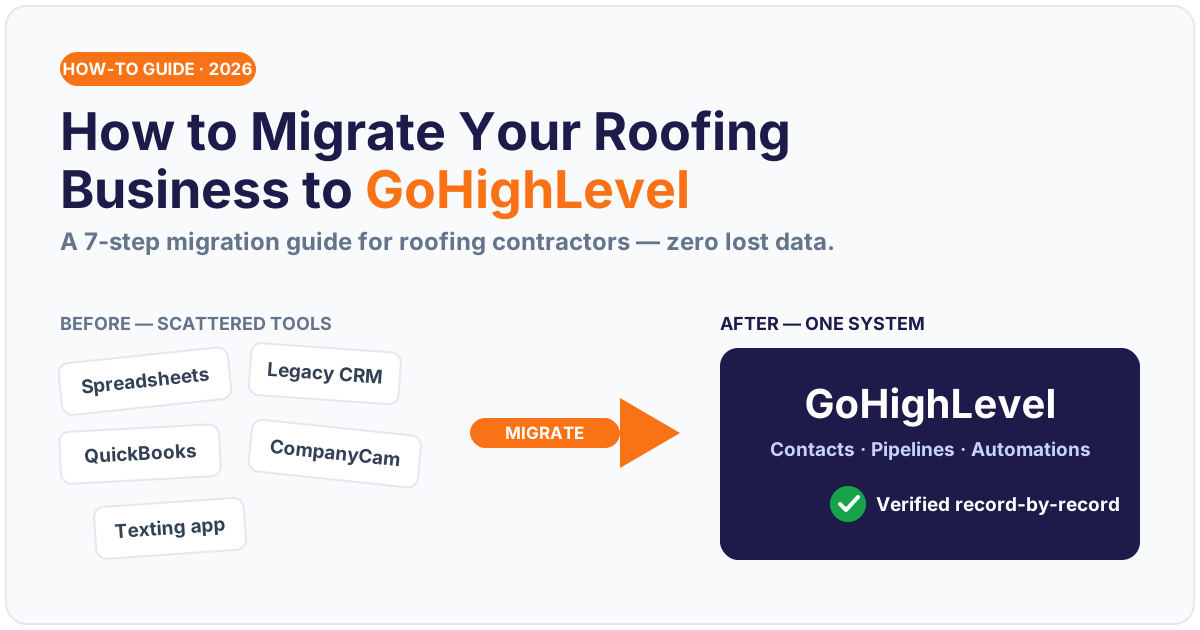
How do you migrate a roofing business to GoHighLevel? You move six things — contacts, pipelines, custom fields, job history, tags, and automations — off your legacy CRM and scattered tools into one GoHighLevel (GHL) account, reconnect the integrations you actually use, then verify every record before you flip the switch. Done in the right order, it’s a seven-step project you finish in days, not months, with zero lost data and no gap in your storm follow-up.
The reason roofers are consolidating in the first place is simple: the average company now juggles 89 different apps (Okta, Businesses at Work 2023), and every tool you bolt on is one more login, one more export, and one more place a storm lead can slip through. This guide walks through exactly how to move a roofing operation onto GHL cleanly — written for the owner tired of re-keying jobs between five tools, and for the GHL agency doing the migration for a contractor client.
Key Takeaways
- Migrating to GoHighLevel means moving six data types — contacts, pipelines, custom fields, job history, tags, and automations — then reconnecting your integrations and verifying record-by-record before go-live.
- The average company runs 89 apps (large enterprises average 211) (Okta, 2023), and workers lose about 60% of the workday to “work about work” like switching apps and hunting for info (Asana, Anatomy of Work 2021) — consolidation is the fix.
- Do it in a strict 7-step order (audit → export & clean → rebuild pipelines → reconnect integrations → rebuild automations → verify → go live) so nothing is lost and your speed-to-lead never goes dark.
- More than 80% of data-migration projects run over time or budget (Oracle/Bloor whitepaper) and only 25% of CRM projects hit their goals, budget, and timeline together (Johnny Grow, CRM Failure Report 2025) — a checklist and a parallel run are what keep yours out of that group.
- CRM returns about $8.71 for every $1 spent (Nucleus Research) — but only once your data actually lives in one place and your automations fire.
Table of contents
- The short answer: what “migrating to GoHighLevel” really means
- Why roofing companies are consolidating into GoHighLevel
- Before you migrate: the pre-migration audit
- How to migrate to GoHighLevel: the 7 steps
- DIY vs. done-for-you migration: the real cost
- Migration mistakes that lose roofing data
- Frequently asked questions
- Related posts
The short answer: what “migrating to GoHighLevel” really means
Migrating to GoHighLevel is not “importing a contact list.” A roofing business runs on relationships and process, so a real migration has to carry both across:
- Contacts — every homeowner, adjuster, and referral partner, with phone, email, and address intact.
- Pipelines — your sales and claims stages (Lead → Inspection → Claim Filed → Approved → Build → Paid), not a generic default board.
- Custom fields — the roofing-specific data that makes automations work: carrier, claim number, deductible, RCV/ACV, roof squares, supplement status.
- Job history & notes — the paper trail on every property so nothing reads as a cold contact.
- Tags — lead source, storm date, neighborhood/route, and status tags your reports depend on.
- Automations — the speed-to-lead SMS, follow-up cadences, review requests, and claim reminders that actually move jobs.
Move all six, keep them wired together, and GHL becomes a single storm-to-deposit system. Move only the contacts and you’ve just built a nicer address book. The whole point of consolidating — and the reason the return on a CRM averages $8.71 per dollar spent (Nucleus Research) — is that the data and the automation finally live in the same place.
Sources: Okta, Businesses at Work 2023 · IBISWorld, 2025 · Nucleus Research · Johnny Grow, CRM Failure Report 2025.
Why roofing companies are consolidating into GoHighLevel
A typical roofing office runs a stack that grew by accident: a CRM for the pipeline, a spreadsheet for storm leads, QuickBooks for invoices, CompanyCam for photos, an email tool, a separate texting app, a review widget, and a website form that emails a shared inbox. Each was a reasonable “yes” at the time. Together they’re a tax on every job.
Number of different apps the typical organization deploys — 89 at the average company, 211 at large enterprises. Source: Okta, Businesses at Work 2023.
The data backs up what the tax feels like. The average organization now deploys 89 different apps, and large enterprises average 211 (Okta, 2023). Knowledge workers switch between roughly 10 apps up to 25 times a day (Asana, 2021), and a Harvard Business Review study of real users found people toggle between apps and windows about 1,200 times a day — nearly four hours a week, roughly 9% of working time, just reorienting after each switch (HBR, 2022). Asana’s index put a blunter number on it: about 60% of the workday goes to “work about work” — searching for information, switching tools, chasing status — leaving only 40% for the skilled work you actually hired for (Asana, 2021).
How the workday splits: ~60% lost to “work about work” (app-switching, searching, status updates) vs. ~40% on skilled work. Source: Asana, Anatomy of Work Index, 2021.
For a roofer, that fragmentation isn’t just annoying — it costs signed jobs. When a hail lead comes in and the info is scattered across five tools, you can’t answer fast, and speed is the whole game: companies that respond to an online lead within an hour are nearly 7× more likely to qualify it than those that wait even 60 minutes longer, yet 23% of companies never respond at all (HBR, 2011). Consolidating into one system is how you make instant, automatic follow-up the default instead of a scramble. (For the deeper math on this, see our breakdown of roofing lead response time.)
This is also why GHL is the destination of choice for the 105,876 roofing contractor businesses operating in the US (IBISWorld, 2025): it folds CRM, pipelines, SMS, email, calendars, a website/funnel builder, reviews, and reporting into one account — and nearly 60% of small businesses now use AI, with 99% running at least one tech platform, up from 93% in 2022 (U.S. Chamber of Commerce, 2025). Consolidation isn’t the trend anymore; the sprawl you’re living in is the outlier.
Before you migrate: the pre-migration audit
Never start a migration by exporting data. Start by taking inventory — the single biggest reason migrations blow past budget (and more than 80% of data-migration projects do run over time or budget, per the Oracle/Bloor benchmark) is that nobody mapped the “before” picture first.
Spend an afternoon and write down four things:
- Every tool you touch in a normal week and what data lives in it — CRM, spreadsheets, QuickBooks, CompanyCam, EagleView/Hover, texting app, email platform, review tool, website forms.
- The data model that matters — which fields your reports and automations actually key off (claim number, carrier, deductible, roof squares, lead source, storm date). Junk fields don’t need to move.
- The integrations you can’t lose — what has to keep talking to what after the move (e.g. QuickBooks for invoicing, CompanyCam for photos, a call tracking number).
- Your live automations — list every text, email, and reminder that currently fires, so you can rebuild the ones that earn their keep and quietly kill the ones that don’t.
This audit is also your kill-list. Migration is the rare chance to not carry three years of duplicate contacts and dead tags into a clean system. Decide what’s worth moving before you move anything.
How to migrate to GoHighLevel: the 7 steps
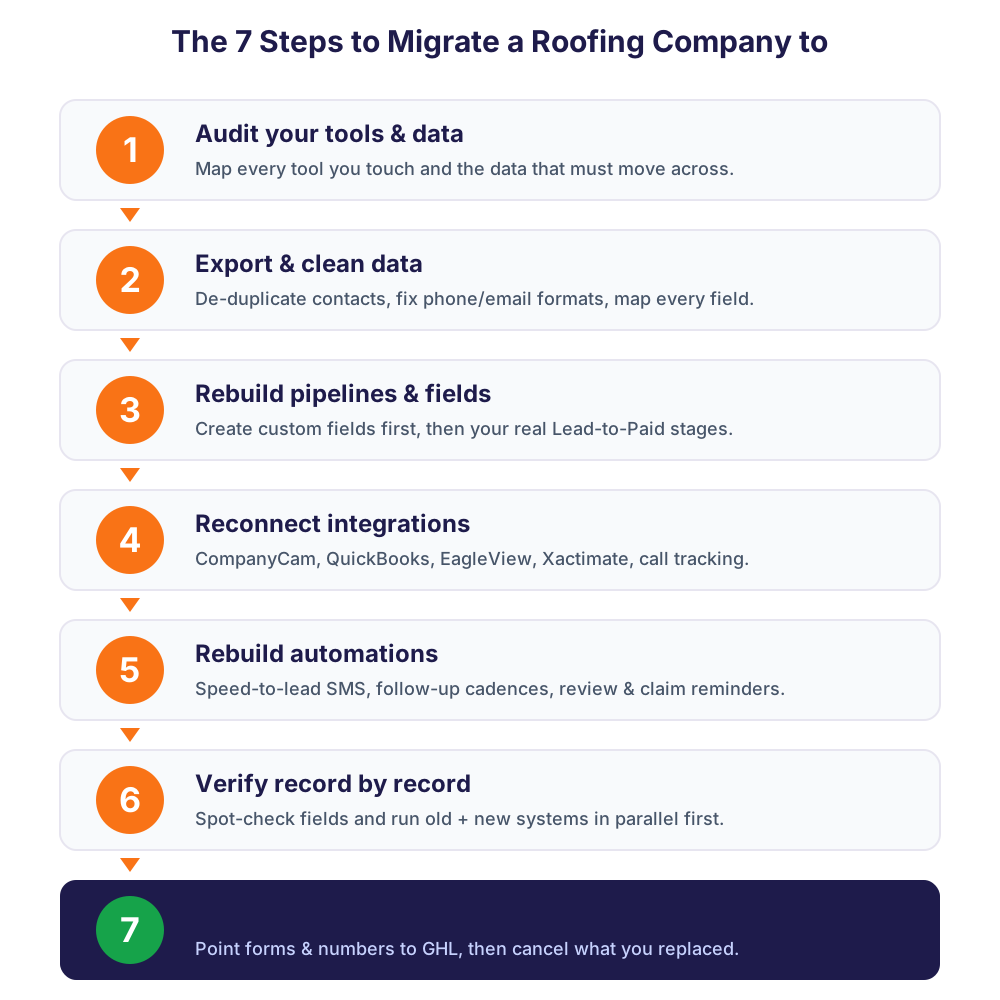
Follow these in order. The sequence matters more than the speed — each step assumes the one before it is done.
Step 1 — Audit your tools and data
The pre-migration audit above is Step 1. Produce a one-page map: source tool → data type → where it lands in GHL. Confirm you have admin/export access to every source system before you go further. If a vendor makes export hard, request your data now — that request can take days.
Step 2 — Export and clean your data
Export each source to CSV. Then clean before you import, because dirty data is far cheaper to fix in a spreadsheet than inside a live CRM:
- De-duplicate contacts (merge the same homeowner appearing three times).
- Standardize phone formats and fix obviously broken emails.
- Normalize your stage and tag names to the ones you’ll use in GHL.
- Map every source column to a GHL field — and flag the roofing custom fields GHL needs created first (carrier, claim #, deductible, RCV/ACV, squares).
Step 3 — Rebuild your pipelines and custom fields in GHL
Create your custom fields first, then build the pipelines that use them. Rebuild your real board — Lead → Inspection Scheduled → Inspected → Claim Filed → Approved → Build Scheduled → Paid — not GHL’s generic default. If your sales and insurance-claim tracks are different animals (they are), give them separate pipelines. Our guide to roofing sales pipeline stages and the insurance-claim follow-up system both map cleanly onto GHL stages.
Step 4 — Reconnect your integrations
This is where roofing migrations get real, because your photos, estimates, and invoices live outside GHL. Reconnect the tools you can’t lose — commonly QuickBooks (invoicing), CompanyCam (job photos), EagleView/Hover (measurements), Xactimate (estimates), and any call-tracking number. GHL connects natively to some tools and, for the rest, through a webhook or a purpose-built connector. This is the step most likely to need a developer: a two-way CompanyCam or JobNimbus ↔ GHL sync so the office and the field stop re-keying the same job.
Step 5 — Rebuild your automations
Now rebuild the workflows that make the system pay for itself, starting with the highest-leverage one: speed-to-lead. A new lead should trigger an instant SMS + email within seconds — because leads contacted inside 5 minutes are up to 21× more likely to qualify than those reached at 30 minutes (Lead Response Management Study). Then rebuild your follow-up cadences, review requests on job completion, and claim-status reminders. Test each workflow with a dummy contact before it touches a real homeowner.
Step 6 — Verify record by record
Do not trust the import summary screen. Before go-live, verify:
- Contact counts match source vs. GHL (and spot-check 20–30 records field-by-field).
- Every contact landed in the right pipeline stage.
- Custom fields populated correctly (claim #, carrier, deductible are the ones that break automations if blank).
- Tags carried over so your reporting and segments still work.
Then run in parallel for a few days — keep the old system read-only while GHL goes live — so you catch anything missing before you’re fully committed. This parallel-run step is the single best insurance against the failure rate: only 25% of CRM projects hit their objectives, budget, and timeline at once (Johnny Grow, 2025), and the ones that do almost always verify before they cut over.
Step 7 — Go live and sunset your old tools
Once the parallel run is clean, cut over: point your website forms, phone numbers, and lead sources at GHL, brief your crews and office, and start working every new lead in the new system. Then actually sunset the old tools — export a final backup, cancel the subscriptions you’re replacing, and delete the shortcuts. If a tool lingers “just in case,” your team will keep half-using it and you’ll never get the consolidation you paid for.
DIY vs. done-for-you migration: the real cost
You can migrate to GHL yourself. Whether you should comes down to two things: how clean your data is, and how many integrations you can’t lose.
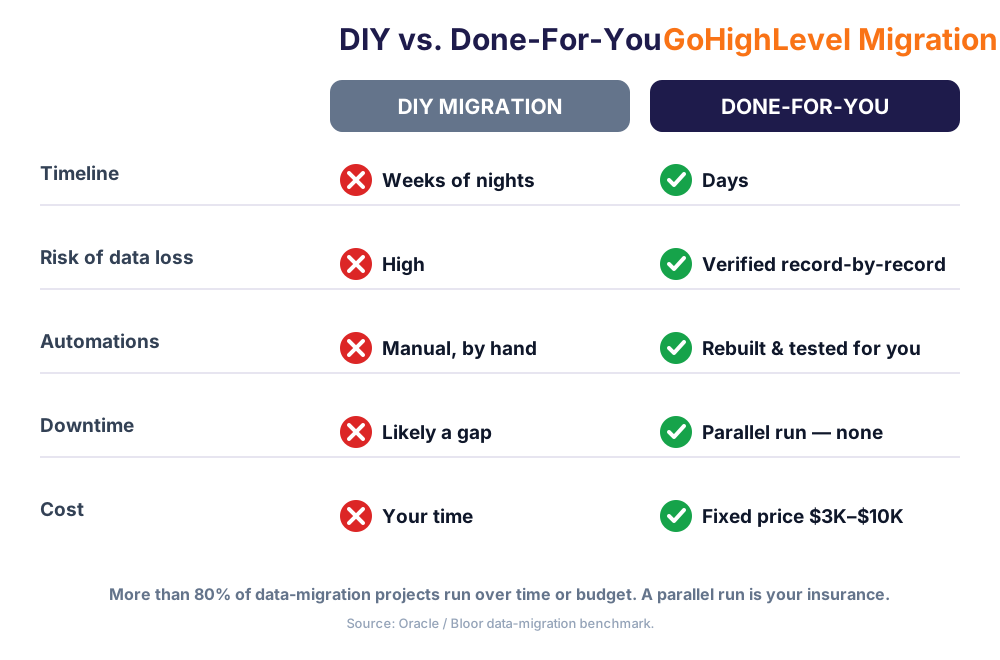
| Factor | DIY migration | Done-for-you migration |
|---|---|---|
| Timeline | Weeks of nights and weekends | Days, run alongside your normal week |
| Risk of data loss | High — no ETL, no verification pass | Low — mapped, migrated, verified record-by-record |
| Integrations | Whatever you can wire yourself | CompanyCam, QuickBooks, EagleView, Xactimate reconnected |
| Automations | Rebuilt manually, tested by hand | Rebuilt and tested for you before go-live |
| Downtime | Likely a gap in follow-up | Parallel run — no dark window |
| Cost | Your time (the most expensive input) | Fixed price, $3K–$10K depending on data volume |
A clean single-tool migration with a few hundred contacts is a reasonable DIY weekend. But if you’re moving three years of job history off AccuLynx or JobNimbus, with QuickBooks and CompanyCam in the loop and live automations you can’t afford to break, the math flips fast — because the expensive failure isn’t the software bill, it’s the storm week you spent debugging imports instead of signing roofs. That’s the exact scope a GHL development and migration service exists to absorb, at a fixed price with a parallel-run safety net. If you’re weighing the move from a specific platform, our vs. AccuLynx and vs. JobNimbus breakdowns lay out what actually changes.
Migration mistakes that lose roofing data
The failures below are why the Oracle/Bloor benchmark finds most migrations run over — and every one is avoidable:
- Importing before cleaning. Duplicates and broken fields multiply once they’re inside a live CRM. Clean the CSV first.
- Skipping custom fields. Import contacts before you build the roofing fields (claim #, carrier, deductible) and the data lands nowhere — silently breaking every automation that reads it.
- Forgetting job history. Move only names and numbers and every homeowner reads as a cold lead; your team loses the context that closes supplements.
- No parallel run. Cutting over cold means you discover what’s missing while live leads are already flowing into a half-built system.
- Leaving old tools running. A migration you don’t finish — where the old CRM lingers — just adds a tool instead of removing four.
- Rebuilding nothing. Migrating data without rebuilding speed-to-lead and follow-up gets you a tidy database that still doesn’t ring the phone. The automations are the point.
Avoid those six and you avoid nearly every expensive migration story. If you’d rather not risk any of them on your own storm season, hand the whole move to a team that does it every week — or pair the migration with a dedicated GHL VA who runs the new system from day one, and track the results against your roofing KPIs.
Frequently asked questions
Migrating a roofing business to GoHighLevel — FAQ
How long does it take to migrate a roofing business to GoHighLevel?
A clean, single-source migration with a few hundred contacts can be done in a few days. A larger move — three-plus years of job history off a platform like AccuLynx or JobNimbus, with QuickBooks, CompanyCam, and live automations to reconnect — typically runs one to two weeks including a parallel-run verification period. The timeline is driven by data volume and how many integrations you can't lose, not by the number of contacts alone.
Will I lose data when I move to GoHighLevel?
Not if you migrate in the right order. The data loss happens when people import before cleaning, skip building custom fields, or cut over without verifying. A proper migration maps your data model first, cleans the CSV, creates the roofing custom fields (carrier, claim number, deductible, squares) before importing, then verifies record-by-record and runs the old system in parallel for a few days before going fully live.
How much does a GoHighLevel migration cost?
Doing it yourself costs your time — usually weeks of nights and weekends, plus the risk of a broken storm-follow-up during the switch. A done-for-you migration to GHL runs about $3,000–$10,000 fixed price depending on data volume and integrations, with platform-to-GHL connectors starting around $3,000–$8,000. Given that CRM returns roughly $8.71 for every dollar spent once it's running, the migration usually pays for itself quickly.
Can I keep using CompanyCam, QuickBooks, and EagleView after migrating to GHL?
Yes. Migrating to GoHighLevel doesn't mean abandoning the field tools your crews rely on. GHL connects to some tools natively and to the rest through webhooks or a purpose-built connector, so CompanyCam photos, QuickBooks invoicing, and EagleView/Xactimate measurements keep flowing — often with a two-way sync so the office and the field stop re-keying the same job. Reconnecting these integrations is Step 4 of the migration.
Should I migrate to GoHighLevel myself or hire someone?
Migrate it yourself if you have one clean data source, a few hundred contacts, and no integrations you can't afford to break — that's a reasonable DIY weekend. Hire a specialist if you're moving multiple years of job history, need CompanyCam/QuickBooks/EagleView reconnected, or can't risk a gap in your storm follow-up. A done-for-you migration uses an ETL pipeline, rebuilds your automations, and verifies every record before go-live, which is what keeps a roofing business out of the majority of CRM projects that miss their budget or timeline.
Do I still need a roofing snapshot if I'm just migrating my data?
They work best together. Migration carries your real data across; a pre-built Roofing Snapshot gives that data a pipeline that's already wired for storm-to-deposit — speed-to-lead SMS, claim tracking, reviews, and follow-up. Migrating into a blank GHL account leaves you rebuilding all of that by hand. Pairing the two means your homeowners and job history land inside a system that's ready to work the day it goes live.
Related posts
- Roofing Snapshot vs. DIY GoHighLevel Build: Which Is Right for You?
- Roofing Sales Pipeline Stages That Actually Convert
- The Insurance Claim Follow-Up System That Never Loses a Job
- Why a 30-Second Response Wins Storm Jobs: Roofing Lead Response Time
- The Roofing KPIs Every Owner Should Track
Written by Marcus Ellison, GHL Agency Partner & Growth Advisor (Tampa, FL). Marcus runs a small GoHighLevel agency on the Gulf Coast that productizes roofing snapshots for contractors across hurricane country. He thinks like an operator first and a marketer second — and he writes for both the agency owner reselling GHL and the roofer who just wants the phone to ring.